Applications

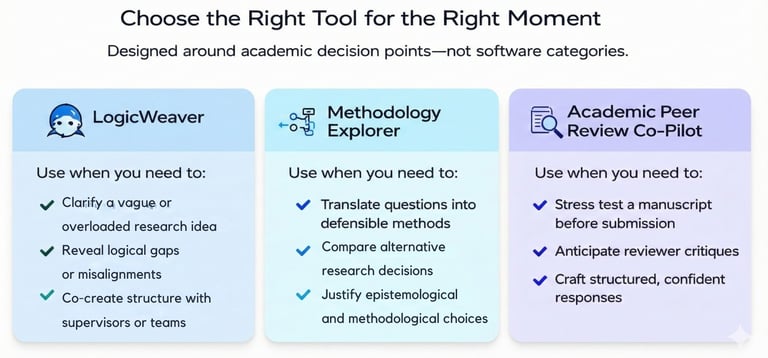
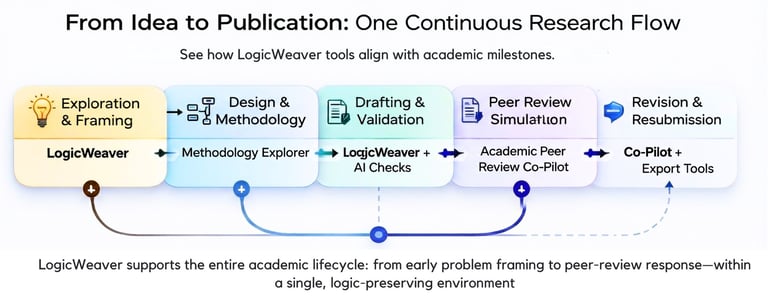
LogicWeaver is more than a single app—it is a small ecosystem of tools designed for different stages of the research journey. Combine them as needed: sketch early ideas, structure your project, review drafts, and curate your reading, all within one environment.

Logicweaver

Visualize your thoughts as connected nodes.

Academic Peer Review Co-Pilot

Get AI-driven reading recommendations.

FAQs

What is Logicweaver?

LogicWeaver is a visual research-planning environment that helps you move from a vague idea to a structured, supervisor-ready plan. Instead of working in a long document, you build your project as interconnected nodes—problem, aims, questions, methods, data, and key references—with AI support at every step.

How does the node system work?

You create individual nodes for core elements of your project (for example, research questions or methods) and connect them with edges to show how they relate. This network view makes gaps, overlaps, and weak links visible immediately and allows you to reorganize your argument or design simply by rearranging nodes on the canvas.

Can AI suggest readings for my topic?

Yes. Through the AI Insights tools, LogicWeaver can suggest relevant literature based on your topic, abstract, or existing nodes. It highlights why each source may be useful and how it connects to your questions—but you always remain responsible for checking quality, relevance, and correct citation.

Who is Logicweaver for?

LogicWeaver is designed for postgraduate students, early-career researchers, supervisors, and research groups who want a more transparent and structured way to design projects. It is especially helpful for complex, interdisciplinary work or for researchers writing in a second language.

Is my data secure?

Absolutely, we prioritize your privacy and keep your work confidential.

How do I get started with Logicweaver?

Create an account, choose the application that matches your current stage—such as the LogicWeaver Research Canvas or the Peer Review Co-Pilot—and start from a blank canvas or a template. You can then invite collaborators, run AI checks, and export your plan or reports whenever you are ready.